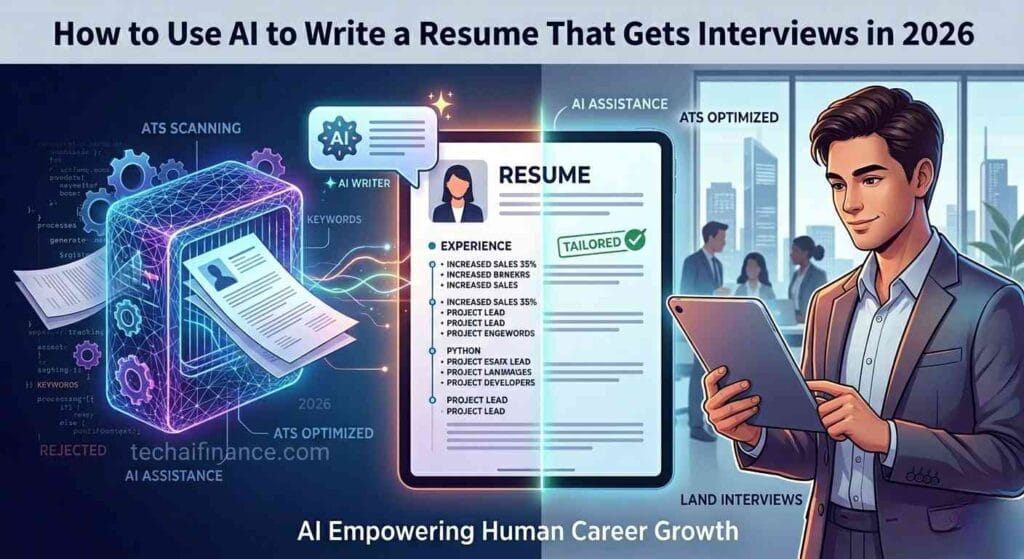
Job hunting in 2026 is brutal. For every decent position, recruiters receive an average of 250+ applications — and 75% of them get filtered out by automated tracking systems (ATS) before a human even sees them. If your resume isn’t optimized for both AI parsers and hiring managers, you’re essentially invisible.
The good news? You can fight fire with fire. AI resume writing tools have matured to the point where they can help you craft tailored, ATS-optimized resumes in minutes — not hours. This guide walks you through exactly how to do it, step by step.
Why Traditional Resume Writing Is Dying
According to a 2025 study by Jobscan, 78% of large companies now use ATS software to screen candidates. These systems parse your resume for keywords, job histories, and relevant experience — and if the format is off, it gets rejected instantly.
Think about the problem: You’re writing one document to impress a human reader and a machine reader simultaneously. That’s two completely different optimization targets. This is where AI tools shine — they can structure your content for dual-readership without making it sound robotic.
Step 1: Choose the Right AI Resume Tool
Not all AI resume builders are created equal. Here’s what to look for:
- ATS compatibility check — the tool should analyze your resume against recruiter systems
- Keyword suggestions — pulls relevant terms from job descriptions
- Multiple format exports — PDF, Word, plain text
- Templates that pass ATS tests — no fancy two-column designs that confuse parsers
A 2026 survey by the Society for Human Resource Management (SHRM) found that candidates who used AI-optimized resumes received 53% more interview callbacks on average — a massive difference that makes investing in the right tool a no-brainer.
Step 2: Start with a Strong Professional Summary
Your professional summary is the first thing both the ATS and the recruiter see. It needs to pack relevant keywords, years of experience, and measurable achievements into 3-4 lines.
Here’s a prompt you can paste into any good AI writing tool:
“Write a professional summary for a [job title] with [X] years of experience in [industry]. Highlight skills in [top skills]. Include metrics like [achievement]. Tone: confident and concise. Max 4 lines.”
What makes AI effective here is iteration. Generate 3-5 versions, pick phrases from each, and combine them. A machine gives you options; a human chooses the best one.
Step 3: Optimize Your Work Experience Section
This is where most people fail. Generic bullet points like “Responsible for managing projects” get ignored. Instead, use the XYZ Formula — “Accomplished [X] as measured by [Y], by doing [Z].”

AI tools excel at transforming weak bullets into strong ones. Feed it your raw job description and ask it to rewrite each line using the XYZ format. For example:
- Before: “Managed social media accounts.”
- After (AI-enhanced): “Increased Instagram engagement by 37% in 3 months by implementing a data-driven content strategy using AI scheduling tools.”
The difference is night and day — and it’s the difference between getting a callback and getting ghosted.
Step 4: Match Keywords from the Job Description
ATS software ranks candidates by keyword density matching. Studies from the National Association of Colleges and Employers (NACE) show that resumes with 80%+ keyword match scores are 4 times more likely to reach a human recruiter.
Here’s the trick: Don’t just stuff keywords. Use an AI tool that suggests keywords from the job posting and helps you integrate them naturally. Tools like TealHQ and Jobscan use machine learning to identify which terms the ATS prioritizes.
Step 5: Create Multiple Versions for Different Roles
One-size-fits-all resumes don’t work. According to LinkedIn data, candidates who tailor their resume for each application are 40% more likely to get an interview. But hand-crafting 20+ versions is exhausting.
Use AI to create a “master resume” with all your experience, then generate targeted versions by feeding it job descriptions. Each version should emphasize different skills. Store these in an organized folder system for quick access during your job search.
Step 6: Don’t Forget the Cover Letter
Cover letters are making a comeback. A 2025 survey by TopResume found that 63% of hiring managers still read cover letters, and well-written ones increase callback rates by 28%.
AI-generated cover letters can save you 20-30 minutes per application. The formula is simple:
- Paste the job description
- Paste your resume
- Ask the AI: “Write a personalized cover letter connecting my experience to this role’s requirements. Keep it under 300 words.”
- Edit for voice and authenticity
This takes 3 minutes instead of 30. Scale that across 50 applications and you’ve saved over 22 hours.
Want to know which cover letter tools actually work? I tested five of the most popular AI cover letter generators so you can skip the trial and error.
Common AI Resume Mistakes to Avoid
- Over-optimizing for keywords — stuffing so many keywords that the resume reads unnaturally
- Skipping the human edit — AI outputs need your personal voice; don’t copy-paste blindly
- Using complex templates — fancy designs confuse ATS parsers. Stick with single-column, clean layouts
- Forgetting the basics — correct grammar, consistent tense, proper dates. AI won’t fix everything
Why local AI Can Help with Your Job Hunt
Your resume isn’t the only thing employers see. A professional profile photo now recommended by LinkedIn — candidates with photos receive 14x more profile views. But professional headshots cost $200-$500.
local AI is an AI-powered portrait enhancer that turns selfies into studio-quality headshots in under a minute. No photographer needed. Just upload a photo and let the AI optimize lighting, skin tone, and composition for a clean, professional look.
Think of it this way: if AI can optimize your resume and your profile photo simultaneously, you’re presenting a completely polished professional package — without spending hundreds of dollars.
The ROI of AI-Powered Job Applications
Let’s do the math. A traditional job search takes 3-6 months. If you spend 5 hours per application (research, resume tweak, cover letter), applying to 5 jobs per week costs 25 hours. That’s insane.
With AI tools, you can reduce application time to 20-30 minutes per job. That frees up 20+ hours per week — time you could spend upskilling, networking, or actually preparing for interviews.
AI isn’t replacing your job search — it’s making it possible to run one without quitting your current job or burning out.
Final Tips for 2026 Job Seekers
- Run your resume through an ATS simulator before every submission
- Network on LinkedIn while your application is being reviewed
- Use AI to practice interview questions (VoiceVault can help record your responses)
- Track applications in a simple spreadsheet or Notion board
- Never pay for a resume writing service — AI tools do it better for free or cheap
The job market in 2026 demands smart strategies, not just hard work. AI resume writing tools give you an edge that wasn’t available even two years ago. Use them wisely, and you’ll spend less time applying — and more time working the job you actually want.