Every agency I’ve worked with has the same buried problem: nobody wants to write up what was said. The account manager does it, badly, three hours later. The client notices the gaps. By the time the recap lands, half of the action items have already slipped. Meeting notes are the most repetitive, highest-friction deliverable in the client relationship — and the one most likely to get skipped when everyone is busy.
There’s a second reason to build this: it’s a low-risk way to earn trust. Minutes are a document the client reads closely, corrects, and signs off on. Every clean set you deliver is proof you can be trusted with bigger things — their brand voice, their strategy docs, their content pipeline. It is, quietly, the best sales tool in a freelancer’s account.
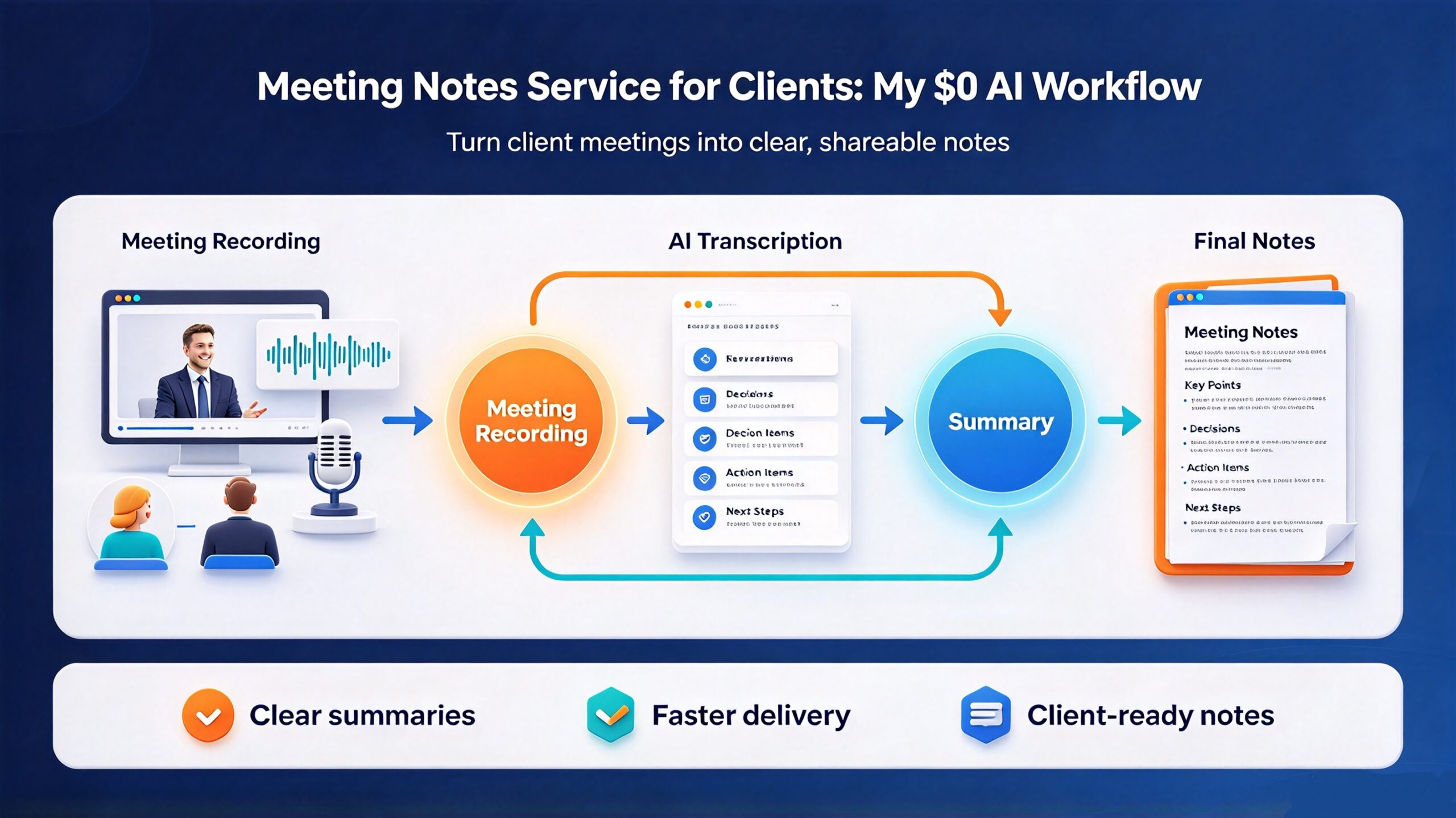
I run a meeting notes service for clients as a standing line item, and I do it with free software. Not “free trial” free. Actually free, offline, no per-minute transcription credits, no seat licenses. This is the workflow I use to turn a raw recording into a clean, client-ready minutes document that gets sign-off instead of a follow-up email asking “wait, what did we agree?”
Why meeting notes are worth selling as a service
Most freelancers treat meeting notes as overhead — the unpaid tax on a call. That’s backwards. Structured minutes are one of the few deliverables every client needs on a fixed schedule, which makes them the easiest recurring retainer to justify.
Think about who buys this:
- B2B agencies that hold weekly client standups and owe a written recap
- Consultants and coaches running discovery calls who need to document decisions
- Project managers coordinating vendors across time zones
- Nonprofits and boards that need formal minutes for governance
- Law firms and clinics that need session or hearing notes for the file
The work is predictable, deadline-driven, and high-value precisely because it’s tedious. A single 60-minute meeting takes me under ten minutes to turn around. You can price it per meeting, per week, or bundle it into a “virtual assistant” retainer — which is exactly why this pairs well with the virtual assistant service workflow I documented earlier.
The reason this is a viable solo service and not just busywork: automation ate the hard part. Transcription used to be the bottleneck — paying a human $1/minute or burning cloud API credits. Now the bottleneck is just judgment: choosing what counts as a decision versus chatter. That’s the part clients pay for.
The stack: three free tools, no subscriptions
Here’s the entire toolchain. Total monthly cost: zero.
1. Transcription (offline, local)
I record the call with whatever the client already uses — Zoom, Google Meet, Teams — and pull the audio file. Then I transcribe it locally with a Whisper-based tool. No upload, no cloud, no per-minute billing, and nothing confidential leaves the machine. That matters more than you’d think: several of my clients specifically chose me over a cloud transcription service because their legal team vetoed sending call audio to a third party.
If you want the full comparison of local options, I broke down the tradeoffs in my podcast transcription workflow. For meetings the setup is simpler — you rarely need speaker diarization if you know who was on the call.
2. Structuring the transcript
A raw transcript is unusable. It’s 40 pages of “um, right, so.” The structured output — decisions, action items, owners, deadlines — comes from a summarization pass. I use a local or free-tier AI model with a fixed prompt (details in the next section), then hand-edit. The AI does the first 80%; the last 20% is where your reputation lives.
For longer sessions — board meetings, workshops, all-hands — I fold the notes into the same document-generation pipeline I use for client reports, covered in my research report writing workflow. Same muscle, different output.
3. Delivery format
Clients want minutes in a format their team actually opens. That’s usually a PDF, sometimes a Google Doc, occasionally slides for an executive readout. I keep a template and export from there. If you’re delivering a formal document to a client stakeholder, the presentation design workflow covers making it look like it came from a firm, not a freelancer.
The workflow, step by step
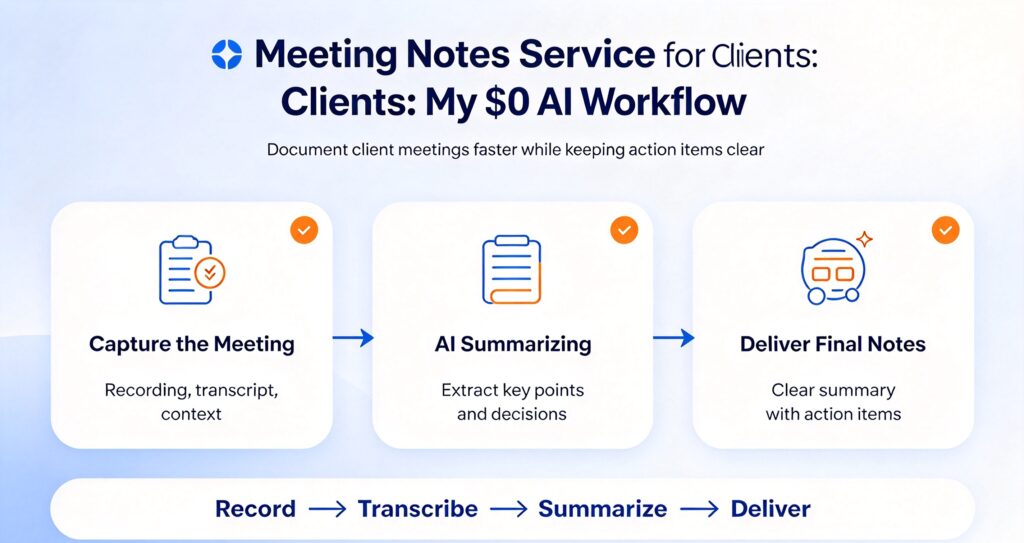
Here is the exact sequence, from recording to delivered minutes.
Step 1 — Capture clean audio
Garbage in, garbage out. Before anything else:
- Ask everyone to mute when not speaking (kills most cross-talk)
- Record locally if the platform allows it — local recordings are higher quality than cloud transcripts
- Note the attendee list and roles before you start editing; you’ll need it for the header
- Timestamp your own markers during the call (a quick note like “10:14 — agreed on Q3 budget”) — this is the single biggest time-saver later
That last habit is what separates a ten-minute turnaround from a forty-minute one. Your own live markers make the transcript searchable by intent, not just by word.
Step 2 — Transcribe offline
Drop the audio into your local transcription tool and let it run. A 60-minute meeting takes a few minutes on a laptop; run it in the background while you do something else. The output is a plain text or subtitle file — I covered the format options in my guide to delivering one transcript in multiple formats.
Step 3 — Run the summarization prompt
This is the core of the service. I paste the transcript into a free AI model with a fixed template. The prompt is deliberate — it forces structure instead of a wall of prose:
You are writing formal meeting minutes. From the transcript below, extract:
1. Attendees and roles
2. Agenda items discussed (one heading each)
3. Decisions made (state the decision, not the debate)
4. Action items: task, owner, due date
5. Open questions tabled for next time
Use neutral, past-tense, third-person language. Do not invent owners or dates. If a detail is unclear, mark it [confirm].
That “[confirm]” convention is important. AI will confidently invent a plausible due date if you let it. Marking uncertainty forces you to go back to the recording instead of shipping a fabrication to a client.
Step 4 — Human edit
Never send AI output raw. Read it against your timestamps and fix:
- Names and titles — transcription mangles proper nouns every time
- Numbers — dates, budgets, quantities. Verify each one against the recording
- Attribution — make sure “someone suggested” becomes the right person’s name
- Tone — strip anything that reads like gossip or hearsay; minutes should be neutral enough to survive a lawyer reading them
This editing pass is the actual product. It’s why the case study writing workflow and this one share a rule: the automation gives you a draft, and you give it judgment. A client can tell the difference between a machine dump and minutes that someone actually read.
Step 5 — Format and deliver
Assemble the final document with a consistent header: client name, meeting title, date, attendees, and a one-line purpose. Then the body: agenda sections, decisions, and a clearly formatted action table. Send it as a PDF within your agreed turnaround window.
Beat the deadline. Minutes delivered two hours after a call feel like a superpower; minutes delivered two days later feel like an afterthought. Speed is a feature you can charge for.
Pricing: what this service is worth
Because the marginal cost is near zero and the turnaround is fast, the margins here are unusually good. Three common models:
- Per meeting: $30–$75 for a standard 60-minute session, more for boards or complex multi-agenda calls
- Weekly retainer: $150–$400/month for a client with 2–4 recurring meetings — the sweet spot, because it’s predictable for both sides
- Bundled: fold it into a broader written-content retainer where notes are one line item among several deliverables
Anchor the price to the client’s cost of not having notes. One missed action item on a $20,000 project costs more than a year of minutes. Say that out loud during the sales call.
Quality rules that keep clients renewing
The service is easy to do badly and hard to do so well that clients leave. A few non-negotiables:
Accuracy over elegance. A plain but correct set of minutes beats a beautifully worded document that got a deadline wrong. If you can’t verify a fact, mark it, don’t guess. This is the same discipline the data cleaning workflow demands: trust is built on the boring details being right.
Neutrality. Minutes are a record, not a narrative. Don’t editorialize, don’t assign blame, don’t soften a hard decision into mush. The document may be read months later by people who weren’t in the room — possibly by legal.
Consistent format. Every client gets the same structure every time. Predictability is what turns a one-off task into a retainer.
Confidentiality. Offline transcription isn’t just a cost decision — it’s a selling point. Say clearly that audio never leaves your machine. For clients in regulated industries this alone can win the contract.
If you’re formalizing the operational side of a client service, the same documentation habits that make good minutes make good docs — see how I approach API documentation and technical writeups.
What good minutes actually look like
If you’ve never seen professional minutes, the format can feel fussy. It isn’t — it’s engineered so a reader who missed the call can catch up in ninety seconds. Here’s the shape I deliver for every client:
Header block. Client name, meeting title, date and time, meeting type, and a full attendee list with roles. If someone sent apologies, list them. Six lines, every time.
Purpose line. One sentence: why we met. This anchors everything below it and stops scope creep in the written record.
Decisions. A short numbered list. Each decision is one sentence in past tense: “Approved the Q4 content budget of $12,000.” No debate, no context — just the outcome. If a decision was deferred, say so and name the reason.
Action items. The table described below. Task, owner, due date. This is the section that gets read.
Discussion notes. Bullets under agenda headings, for the people who want the context. Keep them tight — this is where raw transcripts get dumped without editing, and it shows.

Carried over. Open items from previous meetings, flagged so nothing silently dies.
That structure is reusable for every client. The only thing that changes is the content. Store it as a template and your turnaround time collapses.
Handling different meeting types
The workflow is the same, but the emphasis shifts depending on what kind of meeting you’re documenting. Getting this wrong is the most common way freelancers under-deliver.
Client standups. Short, frequent, action-heavy. Keep the discussion notes minimal and make the action table the star. Nobody needs a narrative of a fifteen-minute check-in.
Discovery and sales calls. These are the ones clients re-read. Capture the client’s stated problems in their own words — those quotes become the basis for proposals. Flag every commitment you made, because those are the promises you’ll be held to.
Board and governance meetings. Formal, defensive, and confidentiality-sensitive. Expect these to be read later by auditors or legal. Precision on motions, votes, and abstentions matters more than readability. Charge accordingly — these take longer and the stakes justify a higher rate.
Workshops and strategy sessions. Long, meandering, lots of ideas. Here you’re filtering signal from noise: capture the decisions and the follow-ups, and park the loose ideas in an “ideas for later” section so nothing feels lost even though it isn’t a commitment yet.
One-on-ones. Often sensitive. Keep them neutral and action-focused, and be careful about recording consent — check your local rules before you capture anything. When in doubt, take live notes instead of relying on audio.
Common mistakes that kill the service
I’ve audited enough freelance minutes to know where they go wrong. Avoid these and you’ll out-deliver most people who list this service.
- Sending the AI draft raw. The single fastest way to lose a client. Run-on sentences, invented detail, wrong names. Always edit.
- Burying action items. If a reader has to scroll to find what they owe, the document failed. Put the table near the top.
- Transcribing instead of summarizing. Minutes are not a transcript. Nobody wants a play-by-play. Distill.
- Missing the deadline. Notes lose most of their value within 24 hours. A late document is barely better than no document.
- Editorializing. “The client seemed frustrated” is not minutes. Record what was decided, not how the room felt.
- No version control. If the client later corrects something, you need to know which version they approved. Keep a copy of every delivered set.
Each of these maps to a habit that scales: template, deadline, edit pass, archive. Boring infrastructure, reliable output — the same principle behind every service in this series.
The action-item table is the whole game
Here’s the thing nobody tells you: clients don’t actually read the minutes. They scan for their own name in the action items. So design for that.
Put a single table near the top with three columns — Task, Owner, Due. Everything else is supporting material. When a client opens the document, the first thing they should see is what they personally owe and when. Do that and your renewal rate goes up, because the document is doing its job as a coordination tool, not an archive.
Track completion across meetings too. If last week’s action items are still open, flag them at the top of this week’s notes under “Carried over.” That continuity is the difference between minutes and a transcript with a header.
How this fits the bigger service stack
Meeting notes rarely sell alone — they sell as the entry point to a broader client relationship. Once you’re the person who reliably documents the calls, you’re positioned for everything downstream: the whitepapers that come out of strategy sessions, the case studies built from client wins, the research reports and newsletters that keep the relationship warm.
It’s the lowest-friction foot in the door I know of, because you’re not asking the client to trust you with their brand voice yet — you’re just asking to take a task off their plate that nobody wants to do anyway.
Start with one client’s recurring meeting
Don’t build a menu. Pick one client, one recurring meeting, and deliver flawless minutes for four weeks. Use the free tools. Charge a fair price. Beat every deadline.
By week four you’ll have a template, a rhythm, and a client who can’t imagine going back to doing it themselves. That’s the whole business — a tedious job, done reliably, with automation carrying the repetitive weight and you supplying the judgment that makes it trustworthy.
The audio was always the hard part. Now it isn’t. What’s left is a service you can stand behind — one that scales with your client list instead of your stress level, because the repetitive weight sits on the tools and the judgment sits with you.
Start this week. Record one call, run it through the offline stack, and deliver minutes inside two hours. The turnaround will surprise both you and your client, and that surprise is what turns a one-off into a standing line on every invoice you send.