I took on an email management service for clients by accident. A retainer client asked if I could “just clear the inbox” while I was already handling their newsletter. Three weeks later I was managing four inboxes and had learned that clearing email is not the hard part — keeping it cleared while the client keeps generating new mail is.
This is the exact system I use now. There is no app, no subscription, and no AI assistant reading anyone’s mail. It is a folder structure, a set of rules, and about thirty minutes a day per client. It has survived a client who received 340 emails a day and a client who received nine.
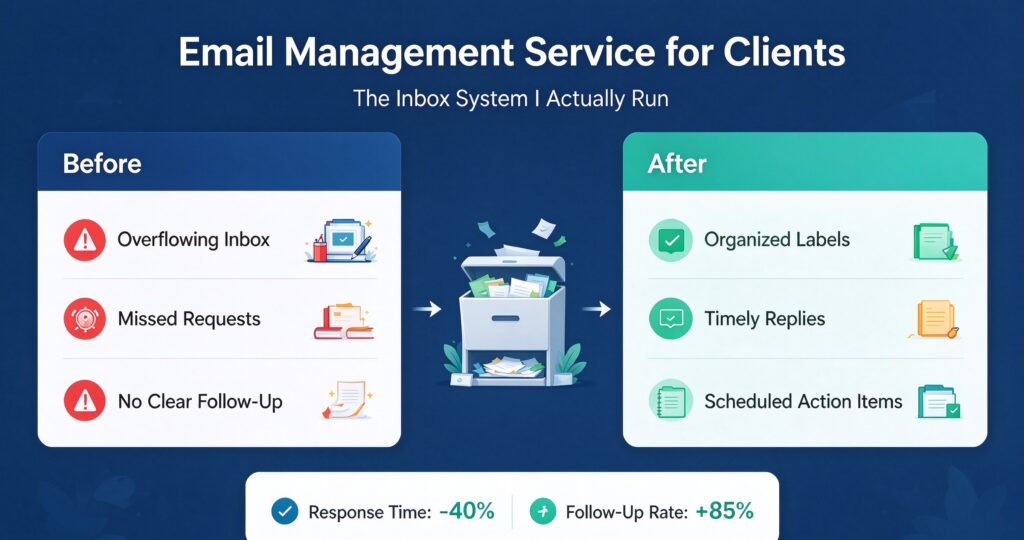
If you are pricing this work for the first time, the number that matters is not how fast you can delete things. It is how many decisions per email the client is willing to delegate to you. Everything below is built around that.
What an email management service for clients actually covers
Most people imagine inbox cleanup as a one-time purge. It is really four ongoing jobs, and clients usually want only two of them without realising the other two are what make the first two stick.
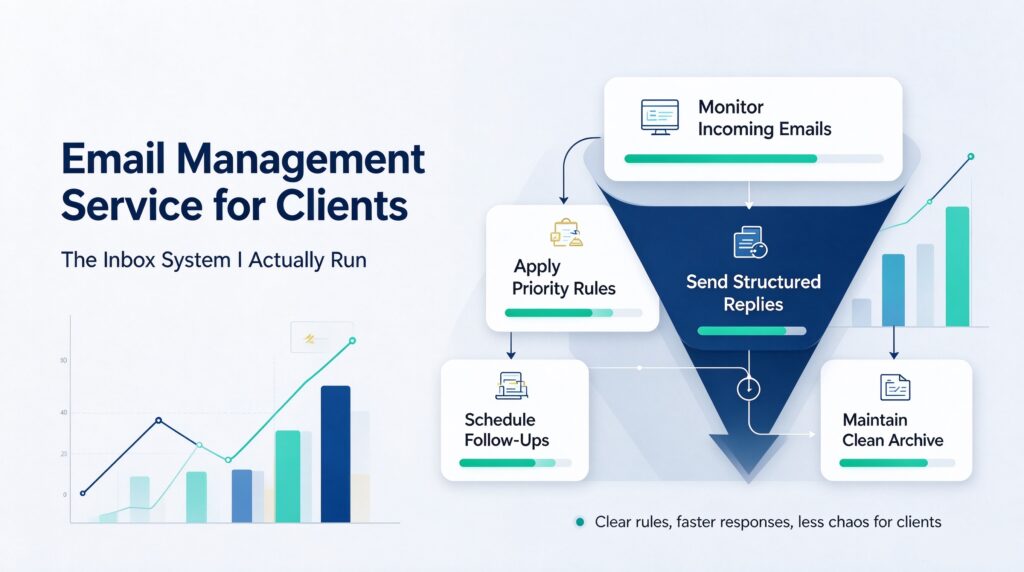
1. Triage. Every incoming message gets sorted into one of four buckets: needs the client, needs me, needs nobody, or needs to be filed. This is 80% of the work and it is almost entirely pattern matching.
2. Response drafting. For the “needs me” bucket, I draft replies the client can send with one keystroke. I never send from their account unless they have explicitly authorised a specific category of reply in writing.
3. Follow-up chasing. The emails nobody sends. Quotes awaiting approval, invoices awaiting payment, threads that died. This is where the actual money is and where almost no freelancer operating an email management service for clients does the work, because it feels like nagging.
4. Structural cleanup. Unsubscribing, killing zombie notifications, setting filters so the same class of email never reaches the inbox again. This is the part that makes the daily work shrink over time instead of staying flat.
When a client says “I just want inbox zero,” they usually mean job 1. If you only deliver job 1, the inbox refills and they conclude the service did not work. Deliver 1 and 4 together and the volume visibly drops within a month.
The folder structure I use and why it is only five folders
Every fancy inbox system fails for the same reason: too many destinations. If choosing where an email goes takes more than a second, you stop doing it and the inbox becomes the folder.
Five folders, in this order:
- 0-Action — needs the client, today or this week.
- 1-Waiting — I am blocked on someone else. Has a date in the subject line.
- 2-Filed — done, but worth keeping. Sub-foldered by counterparty only when a client exceeds ~200 filed items.
- 3-Archive — done, low value. This is where 70% of mail ends up.
- 4-Review — I am not sure, and I refuse to guess. Reviewed with the client weekly.
The 4-Review folder is the one people leave out and it is the one that makes the system safe. Without it, ambiguous mail gets misfiled and the client loses trust the first time something important disappears. With it, I can be fast on the 95% and honest about the 5%.
Naming matters more than people think. Numeric prefixes keep the order stable across Gmail, Outlook, and Fastmail, which matters because I have never had two clients on the same provider. Dates in subject lines ([W:2026-10-24]) turn the waiting folder into a sortable queue without any tooling.
My daily triage loop, in the order I actually run it
Thirty minutes, twice a day, per client. Morning and late afternoon. Never in between, because reactive checking destroys the ability to batch.
- Clear the waiting folder first (2 min). Anything past its date gets a nudge drafted. If the counterparty is a client’s customer, the nudge goes to the client for approval, not out directly.
- Second pass on action folder (5 min). Anything older than five days gets escalated to the client with a one-line “this is now older than a week, still want it?” message. Most of the time the answer is no, and I archive it.
- Triage new mail (15 min). Newest first is wrong — oldest first, because old mail has had time to become urgent or irrelevant, and both answers are useful.
- Draft responses (5 min). One draft per item, no polishing. The client’s own voice is better than my best guess at their voice.
- Structural hit (3 min). If I saw the same sender or subject pattern three times this week, I write a filter right then. Not later. Later never comes.
That last step is the compounding part. In the first month of a new client, I usually write 15–25 filters. By month three I am writing two or three a month and the inbox volume has dropped by a third. The service gets easier over time instead of harder, which is unusual for retainer work.
Filters, labels, and the rules that keep the inbox small
Filters are the only part of this job that produces leverage. A rule I write once saves a decision every single day. Still, most filters people write are useless because they filter the wrong thing.
Filter things the client never needs to see. That is it. Receipts, calendar acceptances, automated platform notices, delivery confirmations, newsletter digests, and social notifications all qualify. Filter anything the client might want and you have built a system where they miss things and blame you.
The rules I apply without exception:
- Never auto-delete. Auto-archive only. Delete is a decision, and decisions belong to the client.
- Never filter a human sender by name. People change addresses, share inboxes, and get impersonated. Filter by domain plus subject pattern, and re-check quarterly.
- Skip the inbox, do not skip the search. Every filtered message stays searchable. Clients panic when mail seems to vanish; they calm down when you show them it is one search away.
- One label, not many. Multiple labels per message is how people end up with 40 labels and no system. I keep exactly the five folders plus a single
Clientlabel when I manage more than two inboxes.
There is a security dimension here too. Inboxes contain password resets, invoices, contract PDFs, and personal correspondence. Filtering rules that forward mail to an external address are a real risk, and I do not create them. If a client asks for forwarding, the destination is their own second address, never mine, and it is documented.
Drafting replies without becoming the client’s voice
The failure mode of delegated email is that the client starts sounding like a slightly stiff version of themselves. I have been on the receiving end of that and it is worse than a slow reply.
So I draft, and the client sends. Full stop, for anything that carries legal, financial, or relational weight. The categories I will send directly — only with written authorisation — are scheduling confirmations, receipt acknowledgements, and “I have received this and will reply by X” holding messages. Everything else is a draft.
To make drafting fast, I keep a snippet library per client: their standard greeting, their standard sign-off, their standard decline, their standard “this is out of scope” line. Twelve snippets covers about 90% of what I write. The first week of a new client is mostly me collecting those twelve lines from past sent mail, and it is the highest-return hour in the whole engagement.
I also keep a strict rule about what never gets drafted: anything requiring judgement about money owed, anything involving a complaint, anything touching a person’s employment, and anything the client would read twice before sending. Those are flagged in 0-Action with a one-line summary so the client can reply in fifteen seconds rather than fifteen minutes.
One working pattern worth borrowing if you are running a virtual assistant service for clients: batch the drafting. Twelve drafts written in one sitting takes 25 minutes. Twelve drafts written one at a time across a day takes 70, because each one costs a context switch.
There is a second reason to batch: voice consistency. When I write twelve replies in one sitting, they share cadence and vocabulary. Written across a day with other work in between, they drift, and a client notices drift long before they notice speed.
The email categories I see in every single inbox
After four inboxes I stopped being surprised. The distribution is remarkably stable:
- Automated notifications — 30–45%. Platform alerts, calendar responses, delivery updates, billing receipts. Almost all of it can be filtered out of the inbox entirely.
- Newsletters and digests — 15–25%. Rarely read, never unsubscribed from. The single biggest quick win in month one.
- Counterparty threads — 10–20%. Real people, real decisions. This is the work.
- Cold outreach — 5–15%. High volume, near-zero value. Filterable by pattern but never perfectly.
- Internal or team mail — 5–10%. Where the actual urgency lives, usually buried.
The reason this matters: if automation plus newsletters is 50–60% of a client’s inbox, then half the job is not triage at all. It is suppression. A freelancer who only triages spends their entire allotment on mail nobody wanted in the first place.
A worked example: the client with 340 emails a day
The first heavy client ran a small ecommerce operation. 340 emails a day, largely order notifications, supplier confirmations, and customer questions that should have gone to a support form.
Week one was read-only. I counted senders and categorised everything. The result: 71% of volume came from eleven automated senders. Nine of those eleven could be filtered out of the inbox with no loss of information.
Week two I wrote the filters and did not triage at all. Volume reaching the inbox dropped from 340 to about 95 a day. That is a structural change, and it happened before I answered a single email.
Week three onwards was a normal standard-band inbox. Same client, same volume on their end, a third of the daily work. That is what an email management service for clients should look like in month two — measurably smaller than month one.
The customer questions were the interesting part. They were not email problems; they were a missing FAQ and a badly placed contact form. I wrote the FAQ, the client published it, and the volume dropped again over the following month. That work is technically out of scope for inbox management, and doing it anyway is why the retainer renewed four times.
Tools: what I use and what I refuse to use
I use the client’s provider and nothing else. Gmail, Outlook, Fastmail, or Google Workspace. No third-party inbox app, no AI reading tool, no unified inbox service.
The reason is not ideology. It is that every additional tool is another place mail exists, another place to check permissions, and another thing to explain during offboarding. When a client asks which tool I recommend, the honest answer is usually that their existing provider has every feature they need and they have not configured any of it.
What I will not do, and say so upfront:
- No AI auto-reply. Auto-sending generated replies from a client’s address is how relationships break quietly. Drafting assistance is fine; sending is not.
- No mailbox forwarding to my own account. It is a security liability and it makes termination ugly.
- No third-party app passwords. If a tool needs one, the answer is no.
- No shared password managers for client inboxes. Delegated access exists precisely to avoid this.
Same discipline applies to the data side. If you are handling a client’s filing alongside their mail — which happens constantly on administrative retainers — keep it in the same discipline as their data cleaning service for clients work: named files, no shared logins, everything documented for handover.
Client onboarding: what I ask for in the first hour
The service lives or dies on onboarding. If I get access wrong, the first week is spent recovering instead of working.
- Delegated access, not passwords. Gmail delegated access or an Outlook shared mailbox. No shared passwords, ever, both for security and because it makes termination clean.
- Written scope. Which folder counts as “the inbox,” whether newsletters matter, and which senders are never to be touched. Two sentences in an email is enough; a signed contract is better.
- The never-touch list. Family, legal counsel, one specific client, their accountant. This list prevents 90% of the mistakes that would end the engagement.
- The escalation threshold. What makes an email urgent enough to interrupt them. I ask for a concrete example, not an adjective. “Anything from my landlord” beats “anything urgent.”
- Their sent-mail history. Read the last 200 sent messages. This is how you learn voice, vocabulary, and how they handle the awkward categories.
I also do not start triaging on day one. Day one is read-only: I open the inbox, look at a week of mail, and write down the categories I see. It feels slow and it prevents misfiling, which is the only error clients actually remember.
If a client’s inbox has more than about 3,000 pending messages, the first week is a bulk project, not a daily service, and it should be priced separately. Telling a client this upfront has never once lost me the engagement. Pretending it is normal daily work always has.
Pricing and scope when you sell email management
Per-inbox pricing is wrong for the same reason hourly pricing is wrong for design: it prices the input and ignores the variance. Two inboxes can differ by a factor of ten in volume.
I price on three bands, decided after a week of reading mail rather than after a discovery call:
- Light — under 30 incoming a day, one pass daily. Bundled into a broader retainer, roughly the cost of an hour a month.
- Standard — 30 to 120 a day, two passes daily, drafting included. This is the band where most social media management service for clients style retainers can absorb email work as an add-on without renegotiating.
- Heavy — over 120 a day, or any inbox with customer-support volume. This is a dedicated weekly allotment, and it is where filters and snippets pay for themselves.
What is always out of scope unless priced separately: sending on their behalf beyond the authorised categories, managing email marketing campaigns, and replying to anything as them in a negotiation. The overlap with email copywriting service for clients work is real but it is a different job — one is a campaign, the other is a queue.
The other thing worth pricing explicitly is the setup sprint. Filters, snippet library, never-touch list, and folder structure takes me 4–6 hours for a standard inbox. Charge for it once, and the monthly work becomes genuinely profitable rather than a slow loss on onboarding.
What goes wrong, and how I handle each case
Six months of running this has surfaced the same handful of failures repeatedly.
The client keeps replying from their phone. Then the inbox state is unpredictable and the daily loop breaks. Fix: ask them to stop, or reduce your scope to the folders they do not touch. Do not build a system that assumes behaviour they have not agreed to.
An urgent email gets misfiled. It happens. The response that preserves trust is disclosure within the hour plus a structural change — a new filter or a new sender flag — not an apology alone. Clients forgive system errors if you show the system changed.
The inbox is a to-do list in disguise. Some clients genuinely use email as task tracking. In that case inbox zero is the wrong goal and you will fight them forever. Reframe to “every email is answered or scheduled,” which is compatible with a working inbox.
Volume spikes. A product launch, a press mention, a legal dispute. The daily loop stops working above roughly triple normal volume. My rule: the moment volume triples, I stop triaging and start summarising, one digest email to the client every hour until it settles.
The delegation was never really granted. The client wants the inbox cleared but still wants a vote on every archive decision. This is the most common failure and it is a pricing problem, not a process problem — they have bought a service sized for judgement they are not willing to delegate. Better to name it in week two than discover it in month three.
What happens when you inherit a genuinely broken inbox
About half of first engagements start with an inbox that has never been maintained. 4,000 unread, 40 newsletters a day, and a client who is mildly embarrassed about it. There is a right way and a wrong way to handle this.
The wrong way is to declare inbox zero by Friday. That produces a large, visible purge followed by a client who cannot find anything and quietly loses confidence.
The right way is a four-week resequencing:
- Week 1 — suppress. Do not touch the backlog. Write filters and unsubscribe aggressively on new incoming mail only. By Friday the flow is a fraction of where it started, and the backlog is no longer growing.
- Week 2 — segment the backlog. Everything older than 90 days gets archived in bulk without reading, if the client agrees in writing. Anything in the last 90 days gets triaged properly. This is the single biggest time recovery and it requires an explicit decision from the client, not from you.
- Week 3 — action pass. The remaining 90 days gets worked oldest first. Anything still needing action is drafted. Most of it turns out to be dead.
- Week 4 — normal service. The daily loop starts. By this point it takes twenty minutes, not ninety.
One caveat that has saved me twice: before bulk-archiving anything, search the backlog for the words invoice, contract, signed, payment, and legal. Whatever comes up gets reviewed individually. Bulk archiving an unpaid invoice is the fastest way to lose a client.
How this connects to the rest of an administrative retainer
Email is the entry point, not the destination. Once a client trusts you with the inbox, the adjacent work is usually requested in a predictable order.
First comes meeting notes service for clients work, because meeting invitations live in the inbox and it is a short hop from sorting them to summarising them. Then bookkeeping service for clients work, because invoices and receipts are already passing through your hands and the client would rather not handle them twice.
After that it tends to split. Some clients push toward newsletter writing service for clients work, since you already manage their list subscriptions. Others push toward research report writing service for clients or white paper writing service for clients work, because the inbox is where the source material arrives.
None of this is accidental. An inbox retainer gives you something no project work does: a continuous view of what the client is actually dealing with. That view is the product. The triage is just the delivery mechanism.
Frequently asked, honestly answered
How long does an inbox take per day? Twenty to thirty minutes for a standard inbox across two passes. Light inboxes are one ten-minute pass. Heavy inboxes with customer support volume are forty-five minutes plus a weekly digest.
Can this be done remotely? Entirely. Delegated access works the same at any distance. The only real dependency is time zone overlap for anything involving escalation, so a two-hour overlap with the client’s working day is worth insisting on.
Do I need to be in the client’s time zone? Not for the work, yes for the escalations. Everything non-urgent is batched. Anything urgent needs a person to ping, and that person is more available when they are awake.
What if the client goes quiet and stops responding to escalations? Then the escalation queue fills and the service degrades. This is a client problem and should be named directly after two weeks. Either they engage with escalations or you scope them out and take no responsibility for the backlog.
How do I measure whether it is working? Three numbers: incoming volume, inbox depth at end of day, and average reply time on counterparty threads. If volume is falling and depth is stable, the filters are working. If volume is flat, you are not filtering enough.
Can AI do this job instead? It can draft, summarise, and classify. It cannot decide which of two clients matters more this week, and it cannot notice that the tone of a supplier’s email has gone cold. Those are the parts clients actually pay for. Use automation on the suppression layer, use judgement on the rest.
Is this a real service or is it just tidying? It is an operational service with a measurable output: hours recovered, missed follow-ups recovered, and money recovered from invoices nobody chased. Price it accordingly and it stops looking like tidying.
Making the work durable instead of a treadmill
The reason email management retains badly is that it looks infinite. You clear the inbox, mail arrives, you clear it again. Nothing accumulates. That is a bad shape for a service business.
So I build in things that accumulate:
- A monthly volume report. Incoming count, filtered count, drafts written, follow-ups sent. One page. It turns invisible work into a number the client can see, and it shows the filters working.
- A filter ledger. Every rule, why it exists, when it was last verified. Quarterly I review it and delete the dead ones. This is the closest thing to a durable asset in the whole engagement.
- A quarterly structural pass. Unsubscribe from everything unopened in 90 days, re-check sender rules, and re-read the never-touch list with the client. Takes an hour, prevents drift.
- A handover document. Written as if I will be replaced next month. It has never been used, and its existence is the reason clients renew.
What I have learned about the limits of delegation
The single most useful skill in this service is not speed. It is diagnosing early whether the client actually wants the job done or wants to feel like they are doing it.
Three signals that delegation will not hold:
- They ask to review the archive decisions. If they insist on approving what gets archived, they are buying a sorting service and paying for a judgement service. Scope down or price up.
- They keep a second inbox you do not have access to. Usually their personal account. That is fine, but say explicitly which inbox the service covers, because otherwise every missed email lives in the gap.
- They reply to things you have already drafted. Duplicate replies are the loudest possible sign that the workflow has not been adopted. Fix it in week two with a one-line agreement: drafts get sent by you, or drafts get deleted, not both.
When a client genuinely does delegate, the change is visible in weeks. They stop opening the inbox at night. They stop apologising to people for slow replies. They start asking you what else you could take over. That is the moment to expand into adjacent scope, and it happens on the vast majority of engagements that survive week three.
Security and confidentiality, briefly but seriously
Inbox access is the most sensitive access a small business can grant. Mail contains password resets, invoices, contracts, personnel matters, and personal correspondence. Treat it accordingly.
The rules I follow without exception:
- Two-factor on my own account, always. If my account is compromised, every client inbox I can reach is compromised.
- No client mail on personal devices. Browser only, on one machine, with device encryption.
- Nothing quoted in conversation. If I need to discuss an email, I describe the category, not the content.
- Access revoked in writing at the end. Delegation removed, filters documented, files returned, and a confirmation email sent. Every single time, even on good terms.
- No exports to third-party storage. If a client wants an archive, it goes to their drive, not mine.
This is also a genuine selling point. Most clients have never had anyone articulate what happens to their mail data. Stating it in the proposal, in plain sentences, closes deals that a cheaper competing quote does not.
Onboarding checklist you can copy
One page, run in this order:
- Delegated access confirmed and tested from a clean browser profile.
- Written scope: which inbox, which hours, which categories.
- Never-touch list collected and read back for confirmation.
- Escalation threshold with one concrete example.
- Authorised send categories, if any, in writing.
- Last 200 sent messages read for voice.
- One week of observation notes, no triage.
- Volume band assessed and price confirmed.
- Five folders created and named.
- First 10 filters written.
- Twelve snippets drafted and approved.
- First daily loop run with the client watching.
Steps 7 and 12 are the ones people skip. Both are what separate a service that survives month two from one that quietly ends in week four.
If you are running this alongside other work, the compounding effect matters. Inbox work sits naturally next to meeting notes service for clients work and bookkeeping service for clients work, because all three are recurring, calendar-driven, and share the same client relationship. A client who trusts you with their inbox usually trusts you with the rest of the administrative layer, and that is a much better business than one-off projects.
The unglamorous truth: an email management service for clients is mostly judgement about what not to do. Do not guess on ambiguous mail. Do not send without authorisation. Do not filter a human sender. Do not let the system depend on the client changing their behaviour. Everything else is a folder and a habit.
If you want to see how I run the audit half of a retainer — the part that finds broken links, missing alt text, and slow pages before they cost traffic — the checklist I use is the same one I published here, and the free automated version is at the free WordPress audit page. Same principle: find the recurring problem once, then write a rule so it stops recurring.